Understanding how to write professional emails is essential for effective communication in today’s business environment. Crafting well-structured and polished messages can significantly enhance your professional image and ensure your ideas are conveyed accurately. Whether you are reaching out to colleagues, clients, or stakeholders, mastering email etiquette is a valuable skill that opens doors to new opportunities and smoother interactions.
This guide provides comprehensive insights into the core principles of professional email writing, from structuring your messages to choosing the right tone, formatting effectively, and ensuring clarity. By following these best practices, you can elevate your email communication, foster positive relationships, and achieve your objectives with confidence.
Fundamentals of Writing Professional Emails

Crafting professional emails is a vital skill in today’s digital communication landscape. An effective email not only conveys your message clearly but also maintains professionalism and fosters positive relationships. Understanding the fundamental components and following a structured approach can significantly enhance the impact of your correspondence.
In this section, we explore the essential elements that make up a professional email, provide a step-by-step guide to structuring your message effectively, and Artikel important etiquette practices to ensure your emails are courteous and appropriate.
Essential Components of a Professional Email
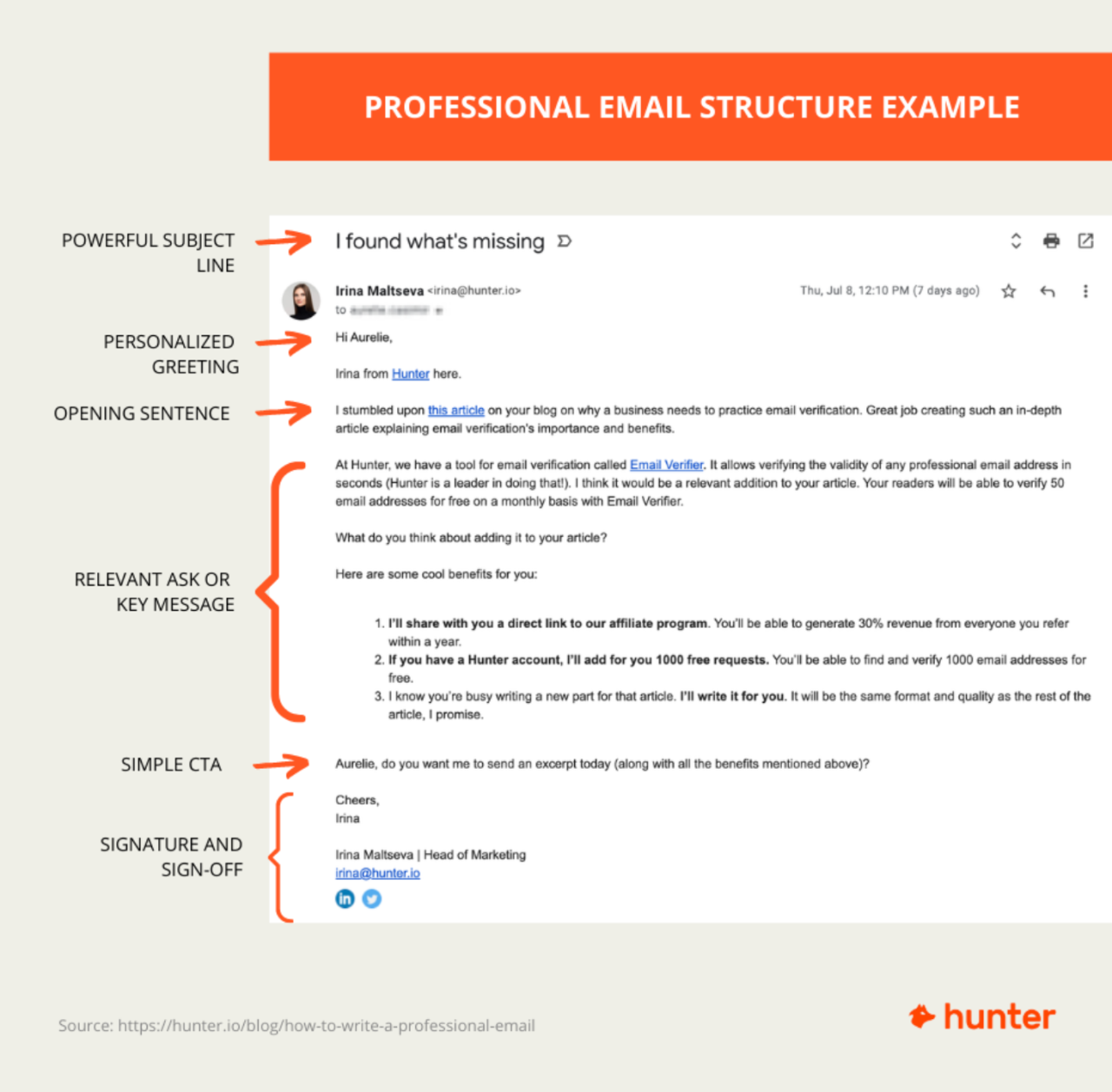
A professional email typically consists of four key parts: the greeting, body, closing, and signature. Each element plays a crucial role in establishing the tone and clarity of your communication.
- Greeting: Opens the email politely, addressing the recipient correctly. Examples include “Dear Mr. Smith,” or “Hello Jane,” depending on formality.
- Body: Contains the main message, organized clearly and concisely. It should be focused, free of jargon, and structured logically to ensure understanding.
- Closing: Provides a courteous sign-off, such as “Best regards,” or “Sincerely,” to signal the end of the message.
- Signature: Includes your name, position, contact information, and any relevant links or disclaimers. It acts as your professional identifier and contact point.
Step-by-Step Guide to Structuring an Effective Professional Email
Following a systematic approach ensures your email is coherent and impactful. Consider the following steps:
- Identify your purpose: Clarify what you want to achieve with your email, whether it’s requesting information, providing updates, or scheduling a meeting.
- Research and personalize: Address the recipient appropriately, using their correct name and title. Personalization demonstrates respect and attention.
- Draft a clear subject line: Summarize the main point succinctly to inform the recipient about the email’s content immediately.
- Write the greeting: Begin with a respectful salutation, tailored to the recipient’s familiarity and formality level.
- Compose the body: Present your message logically—start with a brief introduction, followed by the main points, and conclude with any calls to action or next steps.
- End with a courteous closing: Use an appropriate sign-off that matches the tone of your message.
- Add your signature: Include your full name, position, and contact details to ensure clarity and professionalism.
Do’s and Don’ts of Professional Email Etiquette
Maintaining proper etiquette is essential for effective and respectful communication. The following table highlights key do’s and don’ts to consider when writing professional emails:
| Do’s | Don’ts |
|---|---|
| Use a clear and concise subject line. | Use vague or overly generic subject lines. |
| Address the recipient appropriately, using their correct name and title. | Skip greetings or use overly informal language. |
| Maintain a professional tone throughout the email. | Use slang, emojis, or informal language in formal contexts. |
| Proofread for spelling, grammar, and punctuation errors before sending. | Send emails with typos or errors that could undermine professionalism. |
| Be specific and clear about your purpose or request. | Send overly lengthy or vague emails that confuse the recipient. |
| Respond promptly to received emails, ideally within 24 hours. | Ignore or delay responses unnecessarily. |
| Include a professional signature with your contact details. | Omit your contact information or use an unprofessional sign-off. |
Tone and Language in Professional Communication

Effective professional communication relies heavily on selecting the appropriate tone and employing suitable language throughout your emails. The tone sets the overall impression and can influence how your message is received, making it essential to adapt it based on the context, the recipient, and the purpose of your message. The language used should reinforce clarity, foster politeness, and maintain a positive professional relationship.
Developing an awareness of these elements ensures your emails are both respectful and effective, facilitating smoother interactions in diverse professional settings.
In professional correspondence, tone and language act as the foundation for building trust and credibility. A well-chosen tone respects the recipient’s position and emotions, while precise language minimizes misunderstandings. Striking the right balance between formality and friendliness can enhance communication, whether you are requesting information, providing updates, or addressing concerns. Consistent use of polite phrases and positive expressions cultivates professionalism and encourages a constructive dialogue.
Choosing Appropriate Tone for Various Professional Contexts
Understanding and applying the correct tone is critical for effective communication within the workplace. Different situations demand varying degrees of formality, warmth, and assertiveness. Recognizing these nuances helps in crafting messages that are suitable and respectful.
In formal situations, such as applying for a job, communicating with senior executives, or addressing official matters, a respectful and reserved tone is appropriate. Using professional titles, maintaining a courteous approach, and avoiding slang are essential. For example, phrases like
“Dear Mr. Smith, I hope this message finds you well.”
and
“Thank you for your consideration.”
demonstrate respect and professionalism.
Conversely, in internal communications among colleagues or familiar contacts, a slightly relaxed yet still respectful tone can foster a friendly atmosphere. Phrases like
“Hi John, I wanted to follow up on our meeting.”
or
“Let me know if you need any further information.”
are suitable. Regardless of the context, always aim for a tone that is considerate, clear, and positive, avoiding any language that could be perceived as dismissive or overly informal.
Importance of Clarity, Conciseness, and Politeness in Email Language
Clear, concise, and polite language forms the cornerstone of effective professional emails. Clarity ensures that your message is easily understood, reducing the likelihood of miscommunication. Conciseness respects the recipient’s time, delivering your main points efficiently without unnecessary detail. Politeness maintains professionalism and fosters positive relationships, even when addressing sensitive or challenging topics.
To achieve clarity, use straightforward language and avoid jargon unless it is industry-specific and understood by the recipient. Structuring your email with logical flow, including an introduction, body, and conclusion, helps convey your message effectively. Being concise involves omitting redundant words or phrases and focusing on essential information. Incorporating polite expressions, such as
“Please,” “Thank you,” and “I would appreciate…”
, demonstrates respect and consideration.
Expressions and Phrases to Maintain Professionalism and Positivity
Utilizing appropriate expressions and phrases is vital for conveying professionalism and fostering a positive tone. These phrases help soften requests, express appreciation, and show respect, contributing to constructive and courteous communication.
Here are some useful expressions and phrases:
| Purpose | Examples |
|---|---|
| Beginning an email politely |
|
| Making requests tactfully |
|
| Expressing gratitude |
|
| Ending an email positively |
|
| Addressing issues diplomatically |
|
Incorporating these expressions into your emails not only maintains professionalism but also promotes a positive and respectful communication environment. Always tailor your language to suit the specific context and recipient, ensuring that your tone remains appropriate and constructive throughout your correspondence.
Crafting Clear and Concise Subject Lines
Effective subject lines serve as the first point of contact in professional email communication. They need to quickly capture the recipient’s attention while clearly conveying the purpose of the message. A well-crafted subject line encourages prompt opening and sets the tone for the content that follows.
Creating compelling subject lines involves balancing clarity with brevity, ensuring that the recipient immediately understands the email’s intent without feeling overwhelmed or confused. This skill is essential for maintaining professionalism and efficiency in correspondence across various contexts, from client outreach to internal team updates.
Procedures for Writing Compelling Subject Lines
To develop effective subject lines, follow these structured procedures:
- Identify the core purpose of the email: Determine the main message or action you want the recipient to take. Whether it’s scheduling a meeting, requesting information, or delivering an update, clarity at this stage guides the subject line’s focus.
- Use concise and descriptive language: Keep the subject line brief—ideally under 10 words—while including s that highlight the content’s significance. Avoid vague phrases such as “Hello” or “Update” alone.
- Prioritize the most important information: Place critical details at the beginning of the subject line to ensure they are visible even in truncated email previews.
- Incorporate action verbs when appropriate: Words like “Schedule,” “Review,” or “Confirm” clearly indicate the intended action, making the email’s purpose explicit.
- Customize for the audience: Tailor the language and content to resonate with the recipient’s role or interests to increase engagement.
- Avoid spammy or overly promotional language: Refrain from using excessive punctuation, ALL CAPS, or vague buzzwords that may trigger spam filters or diminish professionalism.
- Review and refine: Before sending, review the subject line to ensure it accurately reflects the email’s content and is free of errors.
Applying these procedures results in subject lines that are both effective and respectful of the recipient’s time and attention.
Examples of Effective Subject Lines for Different Professional Emails
Below are examples illustrating best practices across various email types:
| Type of Email | Effective Subject Line | Ineffective Subject Line |
|---|---|---|
| Meeting Request | Meeting Request: Project Timeline Discussion on March 15 | Meeting |
| Follow-up | Follow-up on Proposal Submission – Response Needed | Follow-up |
| Job Application | Application for Marketing Specialist – Jane Doe | Job Application |
| Invoice Reminder | Reminder: Outstanding Invoice #4567 Due by March 20 | Payment Reminder |
| Project Update | Quarterly Progress Report for Q1 2024 | Update |
Effective subject lines clearly specify the purpose and include relevant details, making it easier for recipients to prioritize and respond appropriately.
Comparison of Ineffective and Effective Subject Lines
| Feature | Ineffective Subject Line | Effective Subject Line |
|---|---|---|
| Clarity | Meeting | Team Meeting Scheduled for March 10 at 3 PM |
| Specificity | Update Needed | Request for Budget Approval Update by March 12 |
| Action-Oriented | Question | Confirm Your Attendance for the Client Conference |
| Brevity | Important Information Regarding Your Account and Next Steps | Your Account Update and Next Steps |
| Relevance | Hi | Draft Financial Report for Q2 Review |
As illustrated, effective subject lines are succinct, specific, and action-oriented, increasing the likelihood of engagement and timely responses. Conversely, vague or overly long ones risk being ignored or overlooked.
Personalization and Audience Awareness
Effective professional emails are distinguished by their ability to connect with the recipient through tailored content and an understanding of audience needs. Personalization not only demonstrates respect and attentiveness but also increases the likelihood of a positive response. Recognizing the unique context of each recipient allows for communication that feels genuine and relevant, thereby fostering stronger professional relationships.
Adapting your email content to suit different recipients and situations requires a deliberate approach. Incorporating recipient-specific details naturally within your message ensures that your communication resonates and fulfills its purpose. Balancing personalization with professionalism is key to maintaining credibility while making your message meaningful and engaging.
Strategies for Enhancing Personalization Without Overstepping Boundaries
When personalizing emails, it is important to use strategies that respect privacy and maintain a professional tone. The following methods can help achieve this balance effectively:
- Use the recipient’s name appropriately: Address the recipient by their preferred name or title to create an immediate sense of familiarity and respect. For example, “Dear Mr. Smith” or “Hello Ms. Johnson.”
- Reference past interactions or shared experiences: Mention previous conversations, meetings, or shared projects to reinforce a connection and demonstrate attentiveness. For instance, “Following up on our discussion during last week’s conference…”
- Incorporate specific details relevant to the recipient’s role or organization: Tailor content to reflect the recipient’s responsibilities, recent achievements, or current initiatives. This shows that your message is customized rather than generic.
- Align the tone with the recipient’s communication style: Match the formality level and language style to their preferences, whether formal, friendly, or casual, based on your knowledge of their communication habits.
- Personalize subject lines and opening sentences: Use relevant information or context to make the email stand out and immediately communicate its purpose. For example, “Regarding Our Upcoming Collaboration on Project X.”
While personalization enhances engagement, it is essential to avoid overstepping boundaries by sharing overly personal information or making assumptions about the recipient’s circumstances. Ensuring that your tone remains respectful, relevant, and professional is crucial for maintaining trust and credibility.
Email Formatting and Readability
Effective email communication is not only about the message content but also about how that message is visually presented. Proper formatting enhances readability, ensures clarity, and fosters a professional impression. When emails are well-structured, recipients can quickly grasp key points and respond appropriately, making your correspondence more efficient and impactful.Good formatting practices involve the strategic use of paragraph breaks, bullet points, and whitespace to create a clean and organized layout.
These elements guide the reader’s eye through the content, prevent overwhelming blocks of text, and emphasize important information. Consistent application of these techniques demonstrates professionalism and respect for the recipient’s time.
Paragraph Breaks, Bullet Points, and Whitespace
Utilizing paragraph breaks judiciously helps segment information into digestible sections, making the email easier to scan. Each paragraph should focus on a single idea or point, typically separated by a blank line to improve visual separation. Bullet points are particularly useful for listing items, steps, or key points, as they break complex information into clear, concise snippets. Whitespace, the empty space around text and elements, reduces clutter and directs attention to essential parts of the message.For example, when listing project milestones, employing bullet points allows the recipient to quickly identify each task and its status.
To maximize readability, maintain uniform paragraph lengths and avoid large blocks of dense text, which can be intimidating and difficult to follow.
Font Styles, Sizes, and Colors for Professional Emails
Consistency and simplicity in font choices are crucial for maintaining a professional appearance. Recommend using standard, easy-to-read fonts such as Arial, Calibri, or Times New Roman, typically set at font sizes between 10 and 12 points. This range ensures clarity across different devices and screen resolutions.Colors should be kept neutral and subdued—black or dark grey for the main text—to avoid distractions and maintain formality.
Use color sparingly, primarily for highlighting essential information, such as deadlines or action items, and ensure sufficient contrast for readability. Avoid decorative fonts, excessive formatting, or bright colors, which can diminish professionalism and hinder comprehension.
Formatting Best Practices versus Common Errors
Below is an HTML table illustrating best practices alongside common formatting errors to help you craft well-structured emails:
| Formatting Aspect | Best Practices | Common Errors |
|---|---|---|
| Paragraph Structure | Use short paragraphs with a single main idea, separated by blank lines for clarity. | Long blocks of text without breaks, making it hard to read or skim. |
| Bullet Points | Use bullet points to list items or steps; keep them concise and consistent. | Overusing long sentences in lists or mixing numbered and bulleted lists inconsistently. |
| Whitespace | Include ample spacing around sections and between paragraphs to prevent clutter. | Crowded text with little or no spacing, leading to visual fatigue. |
| Font Style and Size | Stick to professional fonts like Arial or Calibri, size 10-12 pt. | Using decorative fonts, inconsistent sizes, or varying styles throughout the email. |
| Color Usage | Use black or dark gray for the main text; highlight sparingly with subtle colors. | Bright or multiple colors in the text, which can distract or appear unprofessional. |
Adhering to these formatting guidelines ensures your emails are not only visually appealing but also communicate your messages effectively. Proper formatting reflects your professionalism and enhances your ability to connect with your audience efficiently.
Effective Call-to-Action and Closing Statements

Crafting compelling call-to-action (CTA) phrases and well-structured closing statements plays a crucial role in ensuring your professional emails achieve their intended purpose. An impactful CTA guides the recipient on the next steps, whether it’s providing information, scheduling a meeting, or making a decision. Similarly, a thoughtfully designed closing leaves a positive, professional impression and reinforces the message’s purpose. Mastering these elements enhances communication clarity and promotes prompt, favorable responses.Effective CTAs should be clear, concise, and action-oriented.
They act as a gentle yet persuasive nudge, prompting the recipient to act without ambiguity. The closing statements, on the other hand, should align with the email’s purpose, whether that is requesting an action, expressing gratitude, or offering assistance. When combined, they create a cohesive, professional tone that encourages engagement.
Techniques to Craft Compelling Call-to-Action Phrases
The success of a professional email often hinges on the CTA’s ability to motivate the recipient to respond or act. Here are key techniques to craft effective call-to-action phrases:
- Be Specific and Direct: Clearly state what you want the recipient to do, avoiding vague language. Instead of saying “Please let me know,” say “Please confirm your availability for the meeting by Thursday.”
- Use Action Verbs: Incorporate strong, clear verbs that inspire immediate response, such as “register,” “review,” “schedule,” or “respond.”
- Create Urgency or Timeliness: When appropriate, add a sense of urgency to encourage prompt action. For example, “Please respond by end of day to ensure your spot.”
- Highlight Benefits: Emphasize what the recipient gains from taking action, fostering motivation. For example, “Register now to secure early-bird pricing.”
- Keep It Concise: Limit the CTA to a short, impactful sentence or phrase, making it easy to grasp and act upon.
Examples of Effective Call-to-Action Phrases
Below are some illustrative examples tailored to various email purposes:
- Request for Confirmation: “Please confirm your attendance by replying to this email by Friday.”
- Scheduling a Meeting: “Kindly select a convenient time from the available slots in the attached calendar.”
- Providing Information: “Please review the attached document and share your feedback by Monday.”
- Follow-Up Action: “I look forward to your response to proceed with the project timeline.”
- Offering Assistance: “Feel free to contact me if you need further details or assistance.”
Effective Closing Remarks Based on Email Purpose
Closing remarks should reinforce your message and set the tone for future correspondence. They need to be appropriate to the intent of the email, whether formal, friendly, or collaborative. Here are examples aligned with common purposes:
- Request for Action: “Thank you for your prompt attention to this matter. I look forward to your reply.”
- Providing Information: “Please do not hesitate to contact me for any further details. I appreciate your time.”
- Follow-Up: “I will follow up next week if I haven’t heard from you. Thank you for your consideration.”
- Expressing Gratitude: “Thank you for your support and cooperation.”
- Offering Assistance: “Should you require any additional information, please feel free to reach out.”
Closing statements should be tailored to maintain professionalism while fostering a friendly tone: “Looking forward to your response,” or “Thank you for your attention to this matter.”
Managing Follow-Ups and Email Threads
Effective management of follow-up emails and organized email threads is essential for maintaining professionalism, ensuring clarity in communication, and fostering productive relationships. Proper follow-up strategies demonstrate attentiveness and respect for the recipient’s time, while well-organized email threads help keep records accessible and prevent miscommunication. Mastering these aspects enhances overall communication efficiency in a professional environment.Managing follow-ups involves timely and polite reminders that prompt a response without seeming pushy or impatient.
It is important to balance persistence with respect for the recipient’s workload, ensuring the message is clear and courteous. Additionally, organizing email threads effectively prevents confusion, especially during ongoing discussions that involve multiple topics or participants. Maintaining a structured approach to follow-ups and thread management contributes significantly to professional credibility and operational smoothness.
Polite and Effective Follow-Up Email Strategies
The success of follow-up emails hinges on tact, timing, and clarity. Proper strategies include scheduling follow-ups at appropriate intervals, typically ranging from 48 to 72 hours after the initial email, depending on the urgency of the matter. Follow-up messages should be polite, concise, and reiterate the purpose of the previous communication while expressing appreciation for the recipient’s attention. Using a friendly tone helps maintain positive relationships and encourages a prompt reply.An effective follow-up email should include:
- A clear reference to the previous message or topic.
- A polite reminder about the pending issue or request.
- An expression of understanding for the recipient’s busy schedule.
- A gentle call to action, prompting a response or providing additional information.
For example, a follow-up email might state:
“I wanted to kindly follow up on my previous message regarding the project deadline. Please let me know if you need any further details from my side. I appreciate your time and look forward to your response.”
Organizing Email Threads for Clarity and Record-Keeping
Maintaining organized email threads ensures clarity, easy retrieval of information, and a professional record of communication. Proper management involves consistent use of descriptive subject lines, thread grouping, and archiving practices. Clear subject lines that reflect the ongoing discussion prevent emails from being misplaced or overlooked, especially in high-volume inboxes.Procedures to organize email threads effectively include:
- Using reply functions to keep the conversation within a single thread, avoiding unnecessary new emails.
- Adding relevant s or tags to subject lines for easy identification and filtering.
- Labeling or categorizing emails based on projects, priorities, or clients for quick access.
- Archiving completed conversations systematically to maintain inbox clarity and ensure record retention for future reference.
Professionals should also leverage email management tools or features, such as email folders and search functions, to locate past correspondence rapidly. Maintaining comprehensive and organized email threads simplifies follow-up actions, reduces errors, and enhances overall communication transparency.
Best Practices for Timely Responses and Escalation
Timeliness in responding to emails is a mark of professionalism and respect. Prompt replies facilitate smoother workflows and demonstrate attentiveness to colleagues, clients, and stakeholders. Establishing internal standards, such as responding within 24 hours during business days, helps set clear expectations.Best practices include:
- Prioritizing emails based on urgency and importance, addressing high-priority messages first.
- Using acknowledgment responses for emails requiring more time, such as,
“Thank you for your message. I am reviewing the details and will get back to you by [specific date].”
- Escalating issues appropriately when deadlines are missed or urgent matters arise. Escalation should involve notifying relevant supervisors or teams with a clear explanation of the situation.
- Maintaining a schedule or reminder system to follow up on pending responses or unresolved issues.
Adhering to these practices ensures that communication remains effective, prevents delays, and facilitates proactive problem resolution. Ultimately, consistent follow-up and organized thread management contribute to a professional image and foster trust within professional relationships.
Using Templates and Automation for Efficiency
In the fast-paced world of professional communication, efficiency in email management is essential. By leveraging templates and automation, professionals can save valuable time while maintaining quality and consistency in their correspondence. These tools enable swift responses to common inquiries and streamline repetitive tasks, allowing more focus on complex or high-priority messages.
Creating effective email templates and using automation thoughtfully ensures that communication remains personalized and professional, even when handling large volumes of emails. Proper implementation can reduce errors, improve response times, and foster a more organized email workflow.
Creating Reusable Email Templates for Common Correspondence
Developing a library of well-crafted templates for frequently sent emails simplifies routine communication. Templates should be adaptable to various scenarios, allowing customization while maintaining a consistent tone and structure. For example, templates for meeting confirmations, status updates, or client follow-ups should include placeholders for personalized details such as names, dates, or specific information relevant to the recipient.
Effective templates balance standardization with flexibility, ensuring each message feels personalized without requiring extensive rewriting.
To create reusable templates:
- Identify common email types encountered in your professional role.
- Draft clear and concise message structures for each, including placeholders for variable information.
- Incorporate your company’s branding, such as logo and signature, to maintain professionalism.
- Save templates in your email client or a dedicated document management system for easy access.
Techniques for Automating Responses While Maintaining Personalization
Automation tools, such as email autoresponders and customer relationship management (CRM) integrations, can handle routine replies efficiently. However, it is crucial to preserve a personalized touch to foster trust and engagement. Techniques include:
- Using dynamic fields within templates to insert recipient-specific data automatically.
- Setting rules that trigger personalized follow-ups based on recipient actions or email content.
- Implementing segmented email lists to tailor messages according to recipient interests or roles.
Automation should supplement human interaction, not replace it entirely. Combining automated responses with periodic personalized follow-up enhances effectiveness.
For instance, an automated acknowledgment email can be sent immediately upon receipt of an inquiry, with the message including the recipient’s name and specific query details. A follow-up can then be manually personalized and sent after preliminary review, ensuring the recipient feels valued and understood.
Comparison of Manual vs. Automated Email Approaches
Understanding the differences between manual and automated email management helps in selecting the appropriate strategy for various scenarios.
| Aspect | Manual Email Approach | Automated Email Approach |
|---|---|---|
| Efficiency | Time-consuming, especially with high volume; requires individual attention | Fast and scalable; can handle large volumes with minimal effort |
| Personalization | Highly personalized; tailored to each recipient | Potential for personalization using dynamic fields and segmentation, but may require initial setup |
| Consistency | Dependent on sender; variability can occur | Consistent messaging across all recipients; reduces human error |
| Flexibility | High; messages can be easily adjusted on the fly | Less flexible once templates are set; modifications require updates to templates |
| Response Time | Varies depending on sender’s availability | Immediate or scheduled responses based on automation rules |
| Suitability | Best for personalized, complex, or sensitive communication | Ideal for routine, repetitive messages and initial responses |
Ultimate Conclusion

In summary, mastering how to write professional emails encompasses understanding fundamental structures, maintaining appropriate tone and clarity, and utilizing efficient tools like templates. Applying these strategies will not only improve your communication efficiency but also strengthen your professional reputation. Embrace these techniques to make every email impactful and purposeful, turning everyday correspondence into a powerful tool for success.