Mastering how to draft an email quickly can significantly enhance your professional communication and save valuable time. Efficient email writing enables you to respond promptly to urgent matters, maintain productivity, and streamline your daily workflows. Whether you’re managing a high volume of messages or aiming to improve responsiveness, understanding effective strategies is essential to achieve clarity and speed.
This guide explores practical techniques for preparing, structuring, and utilizing tools to accelerate your email drafting process. From pre-writing preparations to leveraging automation, you’ll learn how to craft concise, impactful emails efficiently while maintaining quality. Developing these skills can transform your communication habits and boost your overall effectiveness in professional settings.
Understanding the Importance of Drafting Emails Quickly
In the fast-paced realm of professional communication, the ability to draft emails swiftly is a highly valued skill. Rapid email responses can enhance productivity, demonstrate professionalism, and facilitate timely decision-making, all of which are crucial in maintaining effective workplace relationships. Whether addressing urgent client inquiries, coordinating team projects, or providing quick updates, being able to compose clear and concise emails promptly can significantly impact business operations.
Efficient email drafting is not only about speed but also about maintaining clarity and professionalism under pressure. In many scenarios, such as during busy workdays, deadlines approaching, or when managing multiple communications simultaneously, the capacity to respond quickly can prevent misunderstandings and foster trust. However, the challenge lies in balancing speed with accuracy, ensuring that messages are well-crafted and free of errors, which requires practice and strategic approaches.
Benefits of Fast Email Drafting in Professional Settings
Quickly drafting emails offers several advantages that directly influence professional effectiveness. It allows individuals to:
- Respond promptly to urgent matters, thereby reducing delays in project workflows or decision-making processes.
- Maintain proactive communication, which enhances the perception of reliability and attentiveness among colleagues and clients.
- Free up time for other critical tasks by minimizing the time spent on composing each message.
- Handle high volumes of correspondence more efficiently, especially in roles that involve customer service or sales.
Common Scenarios Requiring Rapid Email Responses
Several typical situations necessitate quick and effective email drafting skills. These include:
- Responding to client inquiries that impact ongoing negotiations or support issues.
- Providing immediate feedback during project coordination or team collaborations.
- Addressing time-sensitive requests such as appointment confirmations or deadline reminders.
- Managing crisis communication where swift clarification or reassurance is essential.
Challenges Faced When Drafting Emails Rapidly
While speed is beneficial, it can introduce specific challenges that may compromise the quality of communication. These challenges include:
- Risk of typographical errors or grammatical mistakes due to hurried composition.
- Potential to overlook important details or attachments that are vital to the message’s clarity or purpose.
- Difficulty in maintaining a professional tone or appropriate formality under time constraints.
- Increased likelihood of miscommunication or ambiguity, which can lead to misunderstandings.
Overcoming these challenges requires developing effective strategies, such as templates, standardized phrases, or quick-reference checklists, to ensure that rapid email drafting remains both efficient and professional.
Preparing to Write an Email Efficiently
Effective email communication begins well before the first word is typed. Preparing adequately ensures that your message is clear, concise, and accomplishes its intended purpose without unnecessary delays. By gathering essential information and organizing your thoughts beforehand, you streamline the drafting process and reduce the need for extensive revisions.
Proper preparation involves identifying the core objective of your email, pinpointing key points to include, and ensuring that all relevant details are at hand. This proactive approach not only saves time but also enhances the professionalism and impact of your communication. Establishing a systematic preparation routine enables you to compose emails quickly while maintaining clarity and accuracy.
Gathering Essential Information
Before initiating the writing process, it is crucial to collect all pertinent information related to the email’s content. This includes names, dates, specific questions, or requests that need to be addressed. Having these details readily available prevents interruptions during drafting and helps craft a comprehensive message.
Consider the following items to gather:
- Recipient’s full name and correct email address
- Relevant background information or previous correspondence
- Specific questions, requests, or points you need to communicate
- Supporting documents or data that reinforce your message
- Clear understanding of the desired outcome or call to action
Organizing Steps to Clarify Purpose and Key Points
Organizing your thoughts before writing ensures that your email is focused and effective. Clarifying the purpose helps determine the tone, structure, and content necessary to achieve your goal. Identifying key points allows you to prioritize information and prevent unnecessary details from cluttering your message.
Follow these steps to organize your drafting process:
- Define the primary objective of the email, such as requesting information, confirming details, or providing updates.
- Artikel the main points you need to cover to support this objective.
- Determine the order of presentation to enhance logical flow and readability.
- Decide on any supporting evidence or attachments needed to substantiate your message.
- Draft a brief Artikel to guide your writing, ensuring all critical elements are included.
Designing a Quick Preparation Checklist
Implementing a checklist simplifies the pre-writing process and ensures consistency, especially when handling multiple emails. This structured approach reduces oversight and promotes efficiency in your communication strategy.
“An effective preparation checklist acts as a safeguard, ensuring that no vital detail is overlooked before hitting ‘send.'”
Use the following checklist as a quick reference before starting to draft an email:
| Preparation Step | Details |
|---|---|
| Identify the recipient | Check name, position, and email accuracy |
| Clarify the purpose | State the main goal of the email |
| Gather necessary information | Include relevant data, documents, or references |
| Define key points | List the main messages or requests |
| Determine tone and style | Adjust formality based on recipient and purpose |
| Review supporting materials | Attach files or include links as needed |
| Set a clear call to action | Specify what response or action is expected |
Structuring an Email for Speed and Clarity
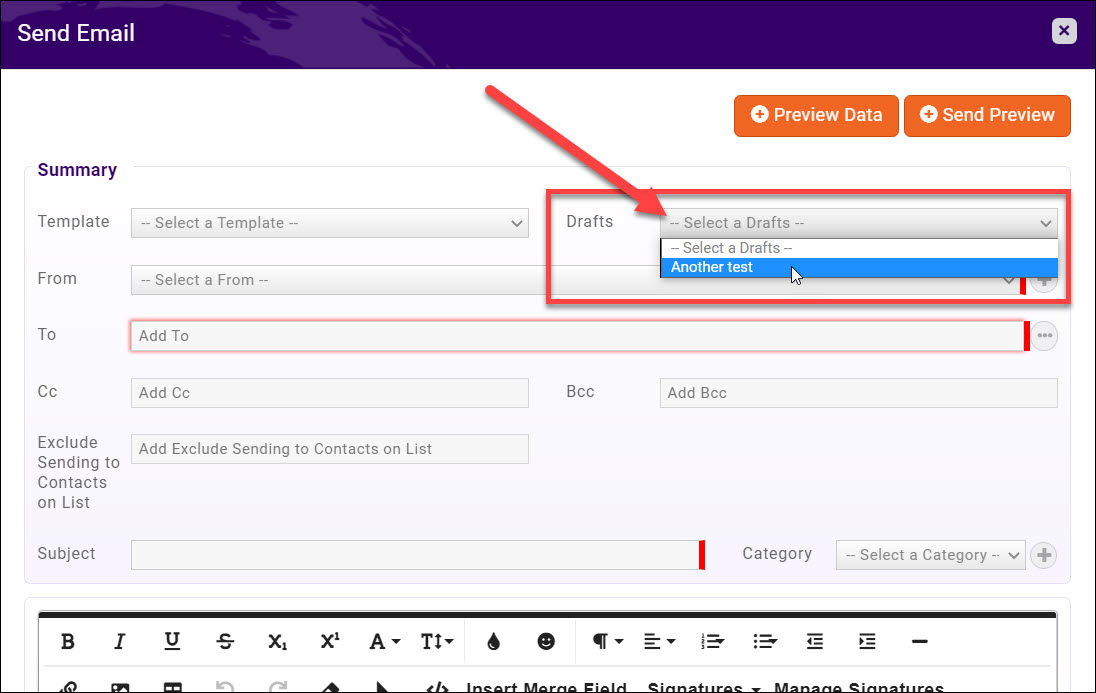
Efficient email communication hinges on a well-organized structure that allows you to convey your message clearly and swiftly. By adopting a consistent format, you can save valuable time during drafting while ensuring your recipients understand your intent immediately. A clear structure also helps prevent misunderstandings and encourages prompt responses, making your communication more effective in professional environments.A thoughtfully structured email typically comprises four key components: a greeting, a statement of purpose, the main content, and a courteous closing.
Each element serves a distinct role: the greeting establishes rapport, the purpose clarifies your intent, the main content provides necessary details, and the closing offers a polite sign-off. Mastering this structure allows you to craft emails quickly without sacrificing clarity or professionalism.
Creating a Template Structure for Quick Drafting
Developing a template that includes these core components can streamline your email drafting process significantly. Here’s an effective structure:
Greeting: Begin with a friendly and professional salutation, such as “Dear [Name]” or “Hello [Team],”. This sets a respectful tone.
Purpose Statement: Clearly state your main reason for writing in the opening sentences, for example, “I am reaching out to discuss…”, or “I would like to inform you about…”.
Main Content: Present your ideas, requests, or information in a concise manner. Use paragraphs to separate different points, and incorporate bullet points or numbered lists to organize complex ideas rapidly.
Closing: End with a polite sign-off such as “Best regards,” or “Sincerely,” followed by your name and contact information if necessary.
Using Bullet Points and Numbered Lists for Rapid Idea Organization
Lists are invaluable tools to organize multiple ideas, actions, or points within your email efficiently. They enhance readability and allow recipients to grasp key information swiftly. When you need to communicate multiple related items, incorporating bullet points or numbered lists can significantly reduce drafting time and improve clarity.To utilize lists effectively:
- Bullet points are ideal for unordered items, such as features, benefits, or options. They provide visual separation and make scanning easy.
- Numbered lists are suited for sequential steps, prioritized actions, or processes that need to be followed in order.
For example:
- Review the attached report before the meeting.
- Provide feedback on the proposed timeline.
- Confirm your availability for the scheduled call.
Using these formats allows you to list multiple ideas rapidly and helps your reader process information efficiently.
Guidelines for Concise and Impactful Language
Conciseness enhances the effectiveness of your message, especially when drafting quickly. Use precise language that communicates your intent without unnecessary words. This approach respects the recipient’s time and ensures your core message is understood immediately.
Key guidelines include:
- Eliminate redundant phrases: Instead of “due to the fact that,” use “because.” Instead of “at this point in time,” simply say “now.”
- Use active voice: “The team approved the plan” is clearer and more direct than “The plan was approved by the team.”
- Be specific and avoid vagueness: Specify dates, names, or figures rather than vague references.
- Limit paragraph length: Keep paragraphs to 2-3 sentences to enhance readability and facilitate rapid editing or addition of new points.
Applying these language principles ensures your emails remain impactful while being drafted swiftly, allowing for professional communication that respects both your time and that of your recipients.
Using Automation and Tools to Accelerate Email Drafting
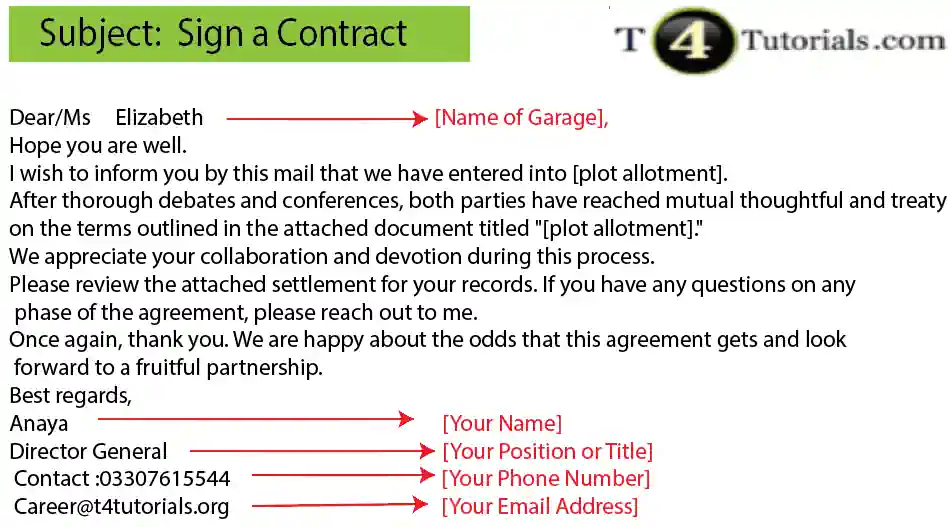
In today’s fast-paced digital environment, leveraging automation and specialized tools can significantly streamline the process of drafting emails. By incorporating these resources into your workflow, you can reduce the time spent on repetitive tasks, enhance consistency, and ensure prompt communication with colleagues, clients, or stakeholders.
Utilizing email templates, canned responses, and management plugins not only speeds up the drafting process but also minimizes errors and maintains a professional tone across correspondence. Setting up auto-replies and quick access snippets ensures that common inquiries and responses are handled efficiently, allowing you to focus more on complex or personalized communication tasks.
Employing Email Templates and Canned Responses
Implementing pre-designed templates and canned responses allows users to quickly insert standard messages applicable to common scenarios. This is especially useful for customer service, sales outreach, or internal updates where similar content is frequently used.
- Templates for Routine Communications: Create templates for onboarding emails, meeting confirmations, follow-up messages, and FAQs. Many email clients such as Gmail and Outlook offer built-in template functionality or the ability to add third-party plugins.
- Canned Responses: Save frequently used responses and insert them with a single click or keyboard shortcut, ensuring consistency and saving time during busy periods.
- Customization and Personalization: Use placeholders within templates that can be quickly filled with recipient-specific information, making emails feel personalized without the additional effort.
Utilizing Email Management Tools and Plugins
Advanced email management tools and browser plugins can facilitate faster drafting by providing features like drag-and-drop content blocks, quick insertion of responses, and efficient organization of message templates.
| Tool/Plugin | Functionality | Example |
|---|---|---|
| Gmail Templates and Extensions | Allows creation and quick insertion of reusable email templates directly within Gmail. | Gorgias, Email Studio |
| Outlook Quick Parts | Enables storing snippets of frequently used text for insertion into emails. | Microsoft Outlook built-in feature |
| Speech-to-Text and Dictation Tools | Facilitates rapid writing by converting spoken words into text, ideal for drafting lengthy or detailed emails quickly. | Dragon NaturallySpeaking, Windows Dictation |
Configuring Auto-Replies and Quick Access Snippets
Setting up auto-replies and snippets enhances responsiveness, especially during high-volume periods or outside regular working hours. These features ensure that recipients receive timely acknowledgments and essential information without manual effort.
- Auto-Reply Setup: Configure automatic responses for incoming emails to inform senders about your availability, response time, or direct them to alternative resources.
- Quick Access Snippets: Store frequently needed responses or information blocks in easily accessible locations within your email client, such as toolbar buttons or keyboard shortcuts.
- Integration with CRM and Helpdesk Systems: Link auto-replies and snippets with customer relationship management or helpdesk tools to personalize responses based on recipient data and context.
Tips and Techniques to Write Emails in Less Time
Efficient email communication is essential in today’s fast-paced environment. Mastering the art of writing emails quickly without sacrificing clarity or professionalism can significantly enhance your productivity. By adopting focused strategies and practical techniques, you can craft effective emails in a fraction of the usual time, ensuring prompt responses and clear communication.Writing emails swiftly involves more than just speed; it requires a disciplined approach to prioritize essential information and streamline the drafting process.
Implementing specific tips and techniques helps eliminate unnecessary details, maintain clarity, and reduce the time spent on proofreading and revisions. Developing a calm and composed mindset further enhances your ability to compose emails efficiently, preventing stress and mental clutter that can slow down your workflow.
Focusing on Key Information and Avoiding Unnecessary Details
Effective email writing in less time begins with understanding the importance of prioritizing content. Concentrate on the core message you wish to convey, and resist the urge to include extraneous information that may distract or overwhelm the recipient. Clear and concise communication ensures your main points are understood quickly, reducing the likelihood of back-and-forth clarifications.To achieve this, consider following these practical steps:
- Identify the primary purpose of your email before composing. Whether it’s to request information, provide updates, or confirm details, keep this goal at the forefront.
- Use bullet points or numbered lists to organize key points, making the email easier to scan and comprehend at a glance.
- Eliminate filler phrases and redundancies. Phrases like “I am writing to inform you that” can often be replaced with direct statements such as “Please note that.”
- Limit the scope of your message to ensure it remains focused and relevant, avoiding tangential or unrelated details.
Quick Proofreading Techniques Without Losing Quality
Speedy email drafting should not compromise accuracy or professionalism. Efficient proofreading methods can help you catch errors swiftly while maintaining the quality of your message.Consider these strategies:
- Adopt a checklist approach: Develop a mental or written checklist of common errors such as typos, grammatical mistakes, and tone inconsistencies to review systematically.
- Use built-in spell check and grammar tools available in most email clients, but always perform a quick visual scan to catch context-specific errors.
- Read the email aloud to catch awkward phrasing, run-on sentences, or missed words. Hearing the message can reveal issues that silent reading might overlook.
- Limit proofreading to a set amount of time, such as 30 seconds to one minute, to prevent over-analyzing and delay.
“Speed and accuracy in proofreading come from systematic checks and disciplined routines, not just rushing through the process.”
Strategies for Maintaining a Calm Mindset to Enhance Speed
A calm and focused mindset is crucial for rapid and effective email composition. Anxiety or mental clutter can hinder your ability to think clearly and write efficiently.Implement these mental strategies:
- Practice deep breathing exercises before starting to compose an email. Even a few deep breaths can reduce stress and improve concentration.
- Break your writing task into smaller segments. Focus on one section at a time—opening, main body, closing—reducing overwhelm and fostering clarity.
- Set a specific time limit for drafting each email to create a sense of urgency while maintaining control over your mental state.
- Maintain a clutter-free workspace and turn off notifications to minimize distractions, allowing your mind to focus solely on the task at hand.
- Adopt a positive outlook, reminding yourself that efficient email writing is a skill that improves with practice and patience.
Practice and Improvement Strategies
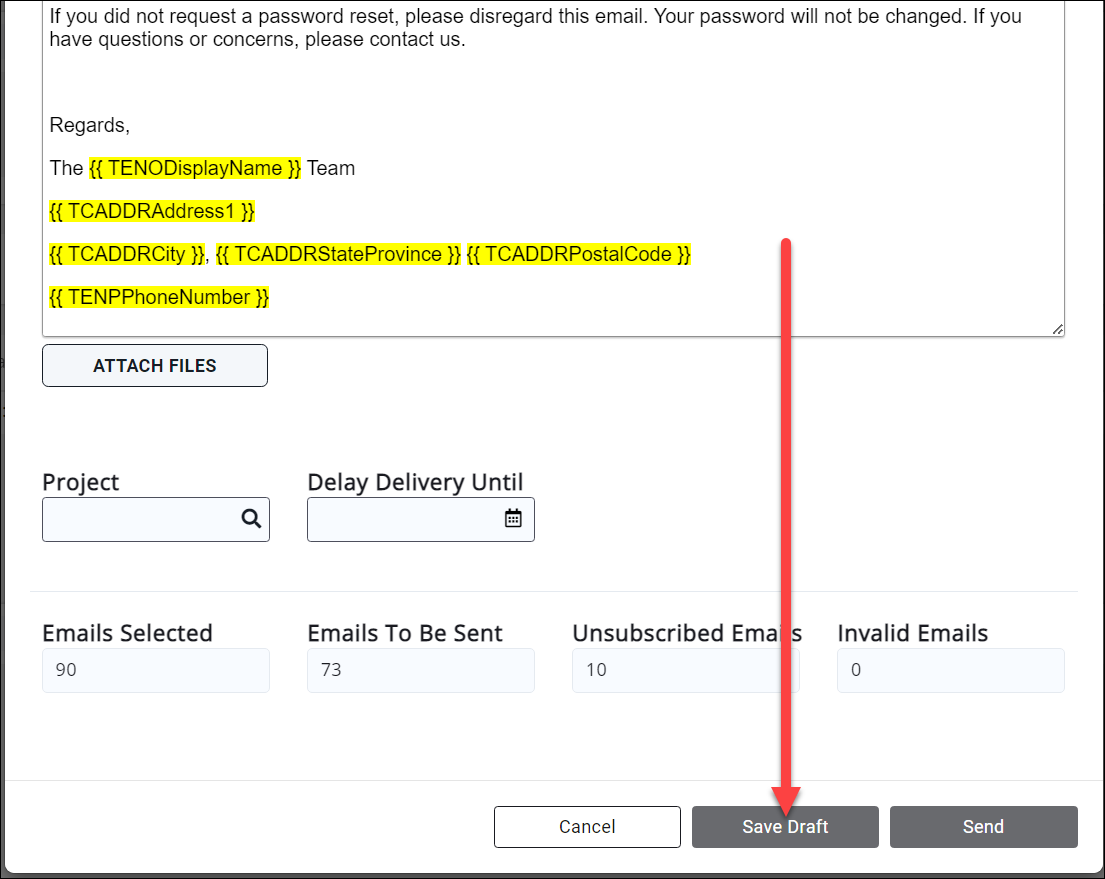
Developing speed and efficiency in email drafting requires deliberate practice and ongoing refinement of habits. Implementing targeted exercises, recognizing productive writing behaviors, and tracking response times can significantly enhance your ability to compose emails quickly and effectively. These strategies not only foster skill development but also promote consistency and confidence in professional communication.Consistent practice allows writers to internalize efficient drafting techniques and reduce hesitation during the writing process.
By systematically engaging in exercises designed to improve speed, individuals can identify areas of strength and pinpoint aspects needing improvement. Additionally, recognizing habits that contribute to faster writing, such as setting clear objectives before starting or avoiding unnecessary revisions, can streamline the process. Monitoring and analyzing response times over time offers valuable insights into progress and highlights opportunities for further optimization.
Design Exercises to Improve Speed in Email Drafting
Engaging in structured exercises is essential for cultivating rapid email drafting skills. These activities should simulate real-world scenarios, encouraging quick thinking and concise communication. For example, set a timer for 5 to 10 minutes and challenge yourself to compose a professional email responding to a common workplace situation, such as confirming a meeting or providing project updates. Focus on clarity, brevity, and relevance, avoiding over-editing during the exercise.Another effective exercise involves paraphrasing or summarizing lengthy information into a succinct email.
For instance, take a detailed project brief or meeting notes and practice transforming it into a clear, concise email within a predetermined time limit. Regularly repeating such activities enhances your ability to distill essential information rapidly, resulting in quicker drafting in actual scenarios.Furthermore, practicing with templates or predefined structures can accelerate the process. Create a set of customizable email templates for frequently sent messages, and challenge yourself to adapt and personalize them swiftly.
Over time, this reduces cognitive load and speeds up the drafting process, especially when dealing with routine communications.
Identify Habits That Contribute to Faster Writing
Certain habitual behaviors can significantly influence the speed and efficiency of email composition. Recognizing and cultivating these habits helps establish a productive writing routine. For example, starting with a clear Artikel or rough draft before refining the message can streamline the editing process. This approach prevents overthinking and minimizes rewriting, allowing you to focus on content clarity from the outset.Another productive habit involves limiting distractions during drafting.
Turning off notifications, closing unrelated tabs, or setting dedicated time blocks reduces interruptions that can slow down writing. Additionally, developing a habit of using shortcuts, such as predefined phrases, abbreviations, or auto-complete features, accelerates the construction of common expressions and responses.Consistent practice of time management techniques, like setting strict time limits for each email or segment of the drafting process, fosters discipline and helps develop an intuitive sense of how long different types of messages should take.
Over time, these habits become automatic, enabling faster and more confident email drafting.
Tracking and Analyzing Response Times to Measure Progress
Monitoring response times provides tangible metrics to evaluate improvement in email drafting efficiency. By systematically recording the time taken to compose emails over a defined period, individuals can gauge their progress and identify patterns or bottlenecks. These insights help tailor future practice sessions and refine strategies for faster communication.Implement a simple tracking system, such as a spreadsheet or a dedicated app, to log key data points: start time, end time, email length, and complexity.
Analyzing this data weekly or monthly reveals trends, such as reductions in drafting time for routine messages or improved speed when using templates. Additionally, comparing response times across different types of emails helps identify which scenarios require more practice or strategic adjustments.Regular review of these metrics encourages accountability and motivates continued improvement. Recognizing tangible progress, such as reducing average drafting time from 15 minutes to under 10 minutes for similar messages, reinforces best practices and boosts confidence in your ability to draft emails swiftly without sacrificing quality.
Final Summary
![Attach a Draft Email in Outlook [Maximize Efficiency]](https://ryota.web.id/wp-content/uploads/2025/09/29-1000x675-1.jpg "Attach a Draft Email in Outlook [Maximize Efficiency]")
In conclusion, mastering how to draft an email quickly combines proper preparation, structured templates, and the smart use of tools. Consistent practice and technique refinement will gradually enhance your speed without compromising clarity or professionalism. By implementing these strategies, you’ll be better equipped to handle your correspondence efficiently and confidently in any situation.