Learning how to improve posture at desk is essential for maintaining overall well-being and preventing common musculoskeletal issues. Proper posture not only enhances comfort during work hours but also contributes to long-term health benefits.
Implementing ergonomic workspace setups, adopting correct sitting techniques, and incorporating movement breaks are key strategies to achieve optimal posture, reduce strain, and boost productivity in your daily routine.
Understanding the Importance of Good Posture at the Desk
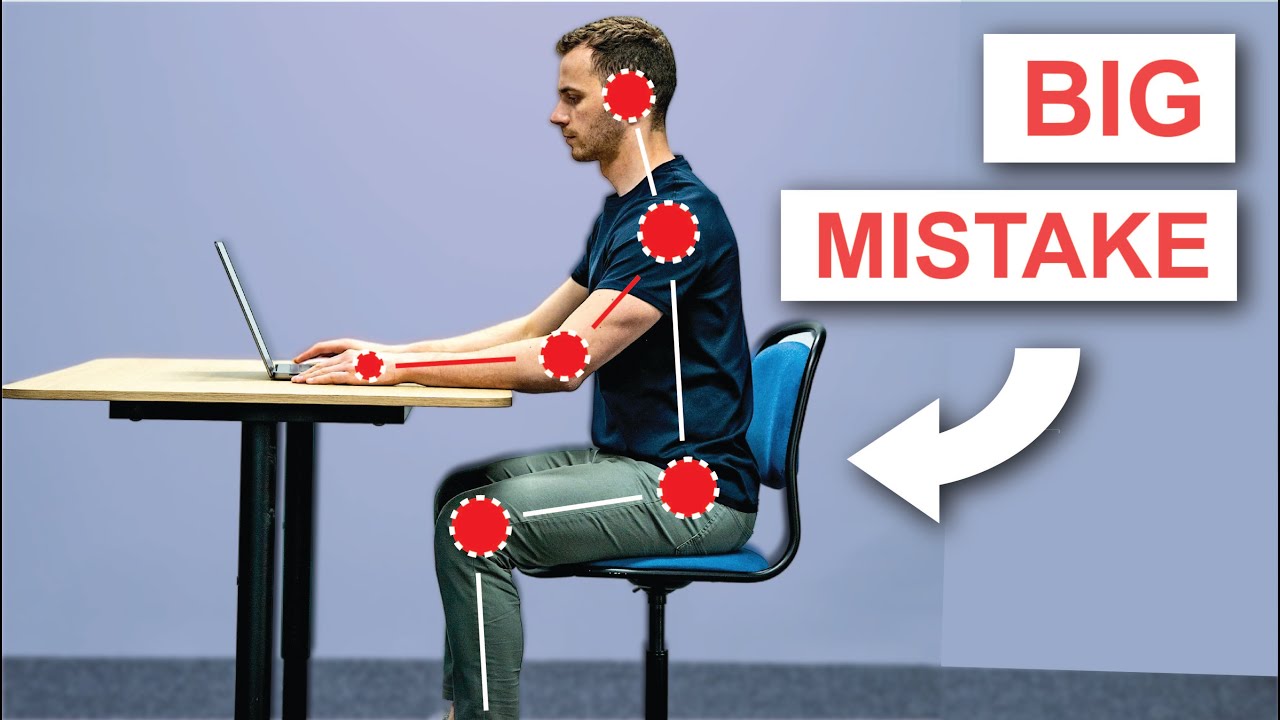
Maintaining proper sitting posture during desk work is essential not only for immediate comfort but also for long-term health and well-being. As many individuals spend a significant portion of their day seated, adopting correct ergonomic habits can prevent a range of health issues and enhance productivity. Recognizing the importance of good posture helps foster awareness and encourages proactive steps toward healthier working habits.Good posture at the desk aligns the body’s musculoskeletal system correctly, reducing strain on muscles, joints, and connective tissues.
This alignment minimizes fatigue and allows for more efficient movement and circulation, which are vital for overall health. When maintained consistently, proper posture contributes to better breathing, improved concentration, and decreased likelihood of developing chronic pain conditions. It also supports mental alertness and can positively influence mood, making work less stressful and more enjoyable.
Health Benefits of Maintaining Correct Sitting Posture
A correct sitting posture offers numerous health advantages that significantly impact daily comfort and long-term wellness. Proper alignment ensures that the body’s weight is evenly distributed, reducing unnecessary pressure on certain areas. This balanced support can prevent the development of musculoskeletal disorders and promote optimal functioning of internal organs.Consistently practicing good posture can enhance lung capacity by allowing the chest to expand fully, improving oxygen intake.
It also reduces the risk of developing repetitive stress injuries, such as carpal tunnel syndrome or tendinitis, caused by prolonged awkward positioning. Furthermore, maintaining proper posture can alleviate muscle tension, decrease headaches resulting from neck and shoulder strain, and prevent the onset of chronic conditions like lower back pain.
Common Health Issues Caused by Poor Desk Posture
Prolonged poor posture at the desk can lead to a variety of health problems that affect both immediate comfort and long-term health. Awareness of these issues emphasizes the importance of corrective measures and ergonomic awareness.The most prevalent issue is back pain, particularly in the lumbar and thoracic regions, stemming from slouched or unsupported seating positions. This pain can become chronic if not addressed, impairing mobility and daily function.
Neck strain is another common concern, often caused by craning over the monitor or improper head positioning, which can lead to tension headaches and cervical spine problems.Repetitive stress injuries are frequent among desk workers who perform repetitive tasks such as typing or mouse use without ergonomic support. These injuries include conditions like carpal tunnel syndrome and tendinitis, which result from sustained awkward wrist or hand positions.
Additionally, poor posture can contribute to shoulder tension, reduced circulation, and fatigue, all of which negatively impact work efficiency and overall health.
Long-term Effects of Sustained Poor Posture on Musculoskeletal Health
Persistently maintaining poor posture over extended periods can have serious repercussions for musculoskeletal health. These long-term effects often develop gradually and may become difficult to reverse if not addressed early.Chronic misalignment can lead to degenerative changes in the spine, such as herniated discs, osteoarthritis, and spinal stenosis. These conditions cause persistent pain, stiffness, and reduced mobility, which can significantly diminish quality of life.
Muscular imbalance is another consequence, where certain muscle groups become overly tight while others weaken, leading to postural imbalances and increased susceptibility to injury.Furthermore, sustained poor posture can influence other parts of the body, including the hips, knees, and ankles, by altering normal weight distribution and joint mechanics. Over time, these biomechanical alterations can cause gait disturbances and joint degeneration.
The cumulative effect not only impacts physical health but also contributes to mental stress and discomfort, emphasizing the importance of addressing ergonomic practices at the desk early on.
Ergonomic Workspace Setup for Optimal Posture
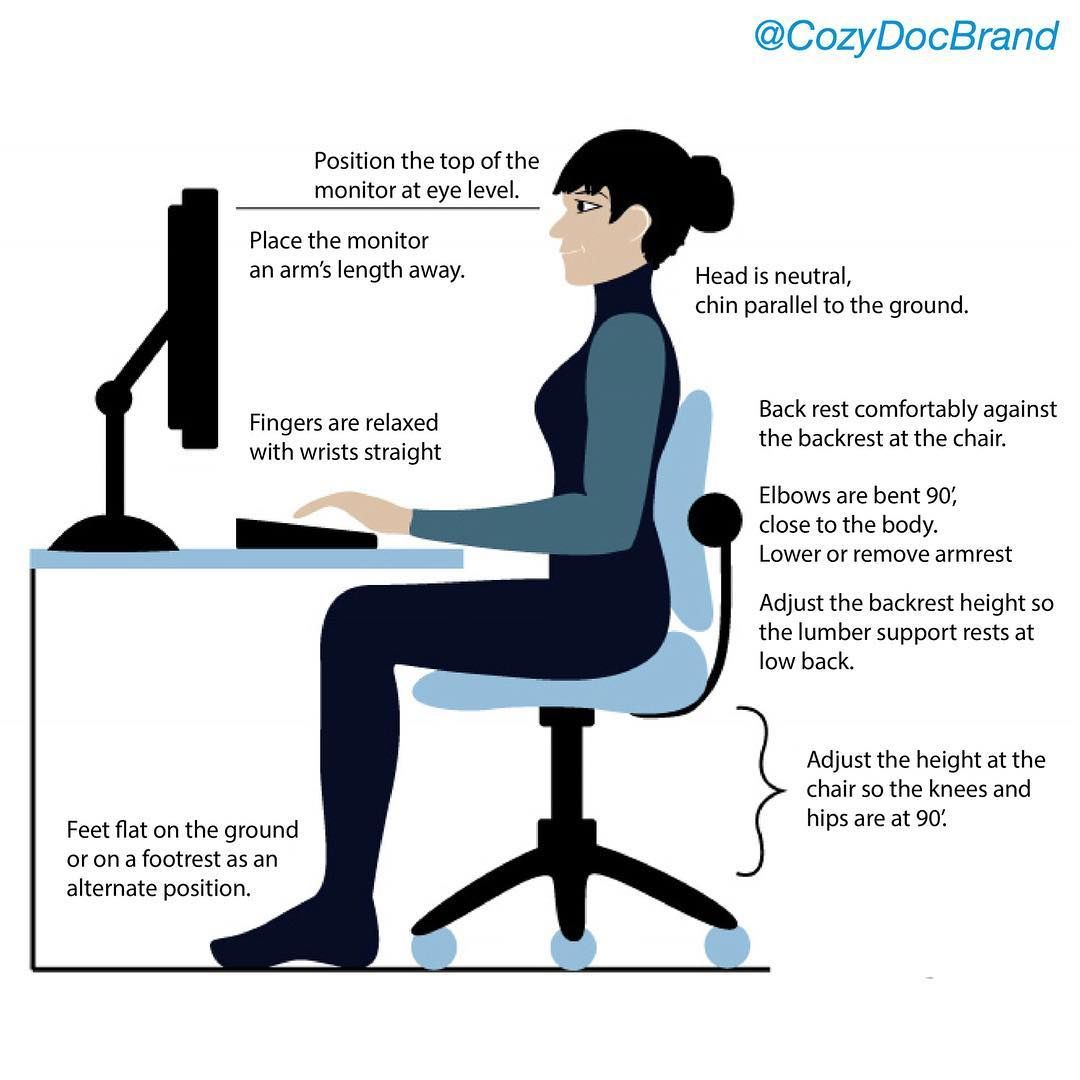
Creating an ergonomic workspace is fundamental to maintaining good posture during extended hours at your desk. Proper arrangement of your chair, monitor, keyboard, and mouse can significantly reduce strain, prevent musculoskeletal issues, and improve overall comfort and productivity. Adjusting each component to fit your unique body dimensions ensures that your workspace supports healthy movement and reduces fatigue.
Implementing an ergonomic setup involves selecting the right furniture and accessories, positioning them correctly, and making personalized adjustments. These measures promote natural alignment of the spine, minimize unnecessary reaching or twisting, and facilitate easier access to essential items, ultimately fostering a healthier and more efficient work environment.
Organizing an Ergonomic Desk
Efficient organization of your workspace hinges on strategic placement of your chair, monitor, keyboard, and mouse. Consistency in positioning these elements according to ergonomic principles helps maintain good posture throughout the workday.
- Chair: Select an adjustable chair that supports the natural curve of your spine. The height should allow your feet to rest flat on the floor, with knees at a 90-degree angle. The lumbar support should fit snugly into the lower back, promoting proper spine alignment.
- Monitor: Position the monitor directly in front of you, about an arm’s length away. The top of the screen should be at or slightly below eye level to prevent neck strain. Tilt the monitor slightly upward to maintain a neutral head position.
- Keyboard and Mouse: Place the keyboard and mouse at a height where your elbows are close to your body and form about a 90-degree angle. Keep the wrists straight and relaxed, and position the mouse within easy reach to avoid overextension.
- Workspace Lighting: Ensure adequate lighting around your workspace to reduce eye strain. Use adjustable desk lamps or indirect lighting to minimize glare on the monitor.
Comparison of Ergonomic Chairs, Desks, and Accessories
Choosing the right ergonomic equipment involves considering various features and budget constraints. The following table provides a comparison of popular options based on key features and price ranges to assist in making informed decisions.
| Product Type | Features | Price Range (USD) | Advantages | Limitations |
|---|---|---|---|---|
| Ergonomic Chair | Adjustable height, lumbar support, breathable fabric, tilt and recline functions | $200 – $800 | Customizable support, promotes good posture, long-term durability | Higher cost may be prohibitive for some users |
| Standing Desk | Height adjustable, anti-fatigue surface, stable base | $300 – $900 | Reduces sedentary time, encourages movement | Requires adjustment for proper height and stability |
| Ergonomic Keyboard | Split design, tenting feature, adjustable tilt, cushioned palm rests | $50 – $200 | Reduces wrist strain, promotes natural hand position | Learning curve for new typing position |
| Ergonomic Mouse | Vertical design, customizable buttons, adjustable sensitivity | $20 – $100 | Minimizes wrist twisting, enhances comfort | Some models may require adaptation time |
| Monitor Stand/Riser | Adjustable height, sturdy surface, cable management options | $20 – $80 | Elevates monitor to eye level, improves posture | Limited space for additional accessories |
Adjusting Workspace Components for Personal Comfort
Personalizing your workspace to suit your body dimensions is essential for ergonomic efficiency. Proper adjustments can be achieved through measurements and thoughtful positioning of equipment.
Key Measurement: The monitor should be at eye level, with the top of the screen aligning with your brow when seated comfortably. Your elbows should rest at a 90-degree angle when typing, and your feet should be flat on the floor or on a footrest.
To adapt your workspace:
- Monitor Height: Use a monitor riser or adjustable stand to elevate the screen until it aligns with your eye level. Ensure the monitor is directly in front of you to avoid twisting your neck.
- Chair Adjustments: Modify seat height so that your feet are flat on the floor, with thighs parallel to the ground. Lumbar support should fit snugly into the curve of your lower back.
- Keyboard and Mouse Placement: Place these devices close to your body to prevent overreaching. Adjust the height of your chair or desk to keep your wrists straight and elbows close to your sides.
- Workspace Layout: Keep frequently used items within arm’s reach. Use document holders aligned with the monitor to reduce neck movement when referencing papers.
Regularly reviewing and fine-tuning your workspace setup ensures sustained comfort and ergonomic correctness, supporting your health during prolonged desk work.
Correct Sitting Posture Techniques
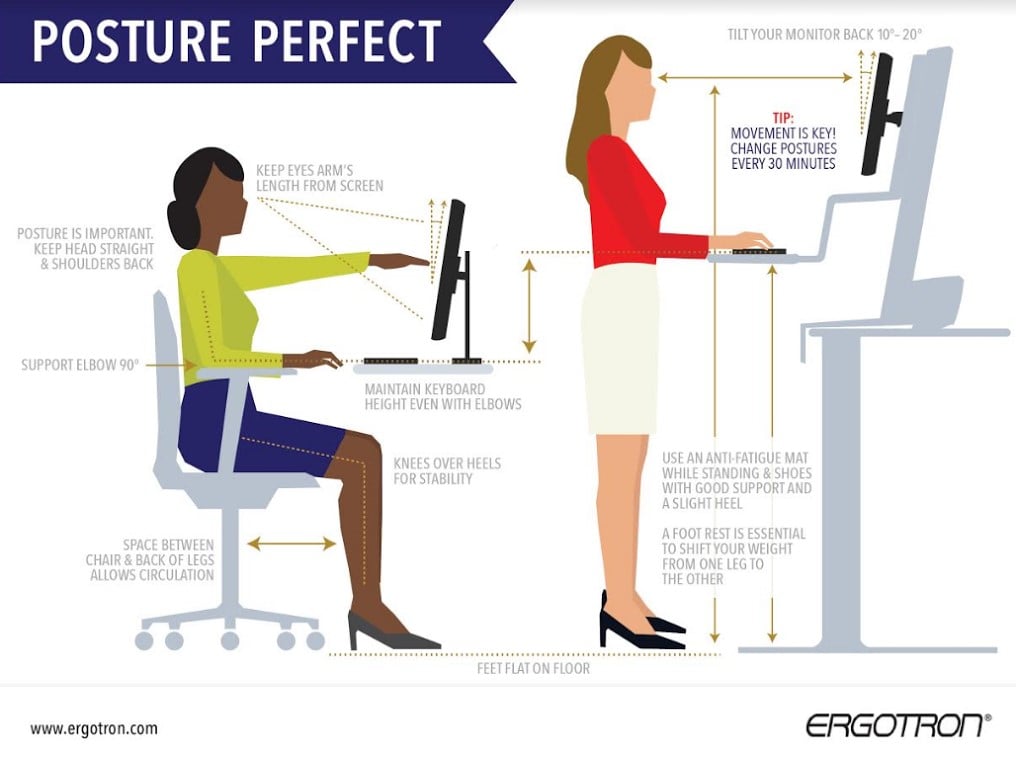
Maintaining a proper sitting posture at your desk is essential for reducing discomfort, preventing musculoskeletal issues, and enhancing overall productivity. Achieving optimal seated alignment involves mindful positioning of your spine, feet, and arms, ensuring that your body supports itself naturally during prolonged periods of work or study. Implementing these techniques can significantly improve comfort and reduce the risk of developing chronic pain syndromes associated with poor ergonomics.Good sitting posture is not merely about sitting upright; it involves aligning your body in a way that distributes weight evenly and minimizes strain on muscles and joints.
Whether you are working with an adjustable chair or a fixed one, understanding the correct techniques ensures you make the most of your workspace setup.
Step-by-Step Techniques for Achieving Proper Sitting Posture
To establish and maintain an effective sitting posture, follow these detailed steps:
- Align Your Spine: Sit back in the chair so that your lower back gently curves into the lumbar support. The entire spine should be aligned, with the natural inward curve of the lumbar region supported to prevent slumping or over-arching.
- Position Your Feet: Place both feet flat on the floor, ensuring your knees are at a 90-degree angle or slightly lower than your hips. If your feet do not reach the ground comfortably, use a footrest to support your feet adequately.
- Support Your Arms: Adjust your chair height so that your elbows rest comfortably close to your body at approximately a 90 to 110-degree angle. Your forearms should be parallel to the ground, and wrists should not be bent while typing or using the mouse.
- Maintain Head and Neck Alignment: Keep your head level, with your ears aligned over your shoulders. Avoid jutting your chin forward or tilting your head downward for prolonged periods.
- Adjust Monitor Height: Position your computer monitor at eye level, about an arm’s length away, to prevent neck strain and promote a neutral head position.
Consistently applying these steps helps in establishing a balanced and ergonomic sitting posture. Remember that small, frequent adjustments during your work session can prevent fatigue and discomfort. Proper posture not only enhances comfort but also supports long-term musculoskeletal health.
Key Posture Checkpoints for Proper Alignment
Ensuring correct posture involves regular self-assessment using straightforward checkpoints. These points serve as a quick reference to maintain ergonomic integrity throughout your workday:
- Back Contact: Your back should be fully supported by the chair’s lumbar support, with your spine in a natural S-curve.
- Feet Position: Both feet flat on the floor or on a footrest, with knees at approximately a 90-degree angle.
- Hip and Thigh Position: Thighs parallel to the ground, avoiding pressure points or excessive slouching.
- Shoulder Relaxation: Shoulders should be relaxed and not slumped or raised toward the ears.
- Elbow and Wrist Angles: Elbows close to your body, bent at about 90-110 degrees, with wrists in a neutral position while typing or using a mouse.
- Head and Neck: Head aligned with the spine, facing forward, with minimal tilt or rotation.
- Monitor Position: Top of the screen at or just below eye level, with the screen directly in front at an arm’s length distance.
In scenarios where an adjustable chair is unavailable, focus on making the best possible modifications with available resources. For instance, if the chair lacks lumbar support, use a small pillow or rolled towel placed behind the lower back. When working at a fixed or non-adjustable seat, consider elevating your feet with a footrest or a sturdy box to maintain proper knee and foot positioning.
For those working with high desks or counters, use a footrest and elevate the work surface if necessary to achieve the same ergonomic principles. Regularly reassess your posture and utilize mirrors or ergonomic checklists to identify and correct deviations, ensuring sustained comfort and health during extended sitting periods.
Implementing Posture Reminders and Accessories
Maintaining good posture during long hours at a desk can be challenging amidst busy work routines. Incorporating practical reminders and ergonomic accessories can significantly enhance awareness and support for proper alignment, reducing discomfort and preventing musculoskeletal issues. These tools serve as cues and physical aids that promote consistent posture habits throughout the workday.Effective implementation of posture reminders and accessories involves selecting suitable gadgets that complement ergonomic principles and establishing routines to reinforce their use.
By integrating visual cues, digital alerts, and supportive devices into daily workflows, individuals can cultivate habits that sustain optimal posture naturally.
Gadgets and Tools for Posture Support
A variety of ergonomic accessories are available to assist in maintaining proper sitting alignment and comfort. These tools are designed with features that promote spinal health, reduce strain, and improve overall workstation ergonomics.
- Ergonomic Cushions: These cushions are contoured to support the lower back or seat, helping to maintain the natural curve of the spine. Memory foam versions conform to body shape, providing pressure relief and enhancing comfort during prolonged sitting.
- Footrests: Adjustable footrests ensure feet are flat and supported, preventing slumping and reducing pressure on the lower back and thighs. They promote better circulation and help maintain proper knee and hip angles.
- Posture Correctors: Wearable devices that gently pull the shoulders back and align the spine. They serve as physical reminders to sit upright and can be discreetly worn during work hours, fostering muscle memory for good posture.
- Monitor Stands and Adjustable Desks: Elevating screens to eye level minimizes neck strain, while height-adjustable desks allow switching between sitting and standing, encouraging movement and reducing static posture.
These gadgets offer benefits such as reducing muscle fatigue, alleviating pain, and encouraging active sitting habits. Selecting the right combination depends on individual comfort preferences and workstation setup.
Incorporating Visual and Digital Reminders
Consistent awareness of posture is essential for long-term improvement. Visual cues and digital alerts serve as effective tools to prompt posture checks and reinforce good habits during the workday.
Visual Reminders
Placing motivational posters, sticky notes, or diagrams of correct sitting posture in visible areas of the workspace creates constant visual cues. For example, a small diagram on the monitor frame illustrating proper back and neck alignment acts as a quick reference during work.
Digital Reminders
Using software applications or device notifications to set periodic alerts encourages regular posture assessments. Many ergonomic apps can remind users to stand, stretch, or check their sitting position every 30-60 minutes.
Timer-Based Breaks
Implementing the Pomodoro Technique or similar time management methods involves working in focused intervals with scheduled breaks. During these breaks, individuals are prompted to stand, stretch, or adjust their posture, reducing muscle stiffness and fostering movement.
“Frequent, gentle reminders—whether visual or digital—are key to developing lasting good posture habits. Consistency in using these cues helps internalize correct alignment as a natural part of the work routine.”
By integrating ergonomic accessories and reminder systems into daily practices, individuals can create a supportive environment that encourages sustained good posture, leading to greater comfort and reduced risk of injury over time.
Developing a Personalized Posture Improvement Plan
Creating a tailored posture improvement plan is essential for effectively addressing individual ergonomic needs and ensuring sustainable progress. Personalization recognizes that each person’s body, workspace, and habits differ, making a customized approach more practical and motivating. By establishing clear assessment methods, setting realistic goals, and implementing consistent tracking, individuals can systematically improve their posture over time, reducing discomfort and enhancing productivity.An effective plan involves a structured process that begins with understanding your current posture status, followed by defining achievable objectives, and continuously refining strategies based on progress.
This approach fosters accountability and empowers individuals to make gradual, lasting improvements. Incorporating personalized strategies also encourages consistency and resilience, helping overcome common challenges in maintaining good posture.
Assessing Current Posture and Setting Achievable Goals
Begin by conducting a comprehensive assessment of your current posture during typical work tasks. This can involve recording yourself while working, taking note of habitual slouching, uneven weight distribution, or neck strain. Self-awareness is the first step toward targeted improvement. Consider consulting a healthcare professional or ergonomist for an expert evaluation, especially if persistent discomfort exists.Set specific, measurable, attainable, relevant, and time-bound (SMART) goals based on this assessment.
For example, “Maintain an upright seated position with shoulders relaxed and feet flat on the floor for at least 30 minutes per hour over the next month.” Goals should be realistic to avoid frustration and to promote steady progress. Tracking tools such as posture journals, mobile apps, or checklists can aid in monitoring adherence and identifying patterns.
Tracking Progress and Adjusting Strategies
Consistent tracking provides valuable insights into what strategies are effective and where adjustments may be needed. Establish a routine for evaluating posture at regular intervals—daily or weekly—to assess adherence and comfort levels. Use visual records like photos or videos to compare posture alignment over time, and note any recurring issues or improvements.Review progress periodically to determine if goals are being met or if modifications are necessary.
For instance, if a goal to sit upright for 30 minutes consistently is achieved, consider increasing the duration or incorporating varied ergonomic exercises. Flexibility in strategies ensures continuous improvement and prevents stagnation. Adjustments may involve modifying workspace setup, increasing awareness prompts, or incorporating additional ergonomic accessories tailored to evolving needs.
Common Obstacles and Solutions in Maintaining Posture Improvements
Maintaining consistent good posture can encounter various challenges. Recognizing common obstacles and implementing practical solutions enhances the likelihood of long-term success.
- Fatigue or Discomfort: Periodically, maintaining perfect posture can lead to muscle fatigue. To mitigate this, incorporate regular breaks, stretching routines, and ergonomic adjustments to reduce strain.
- Lack of Awareness: Distractions or ingrained habits may cause lapses in posture. Use reminders such as alarms, posture apps, or visual cues to increase mindfulness.
- Uncomfortable Workspace: An improperly set workspace can hinder good posture. Regularly reassess and optimize your ergonomic setup, including chair height, monitor position, and desk arrangement.
- Inconsistent Routine: Irregular work patterns or motivation lapses can impair progress. Establish a daily routine with scheduled posture checks and incorporate ergonomic exercises into your day.
Consistent self-awareness, realistic goals, and adaptive strategies are key to developing a sustainable posture improvement plan.
Summary
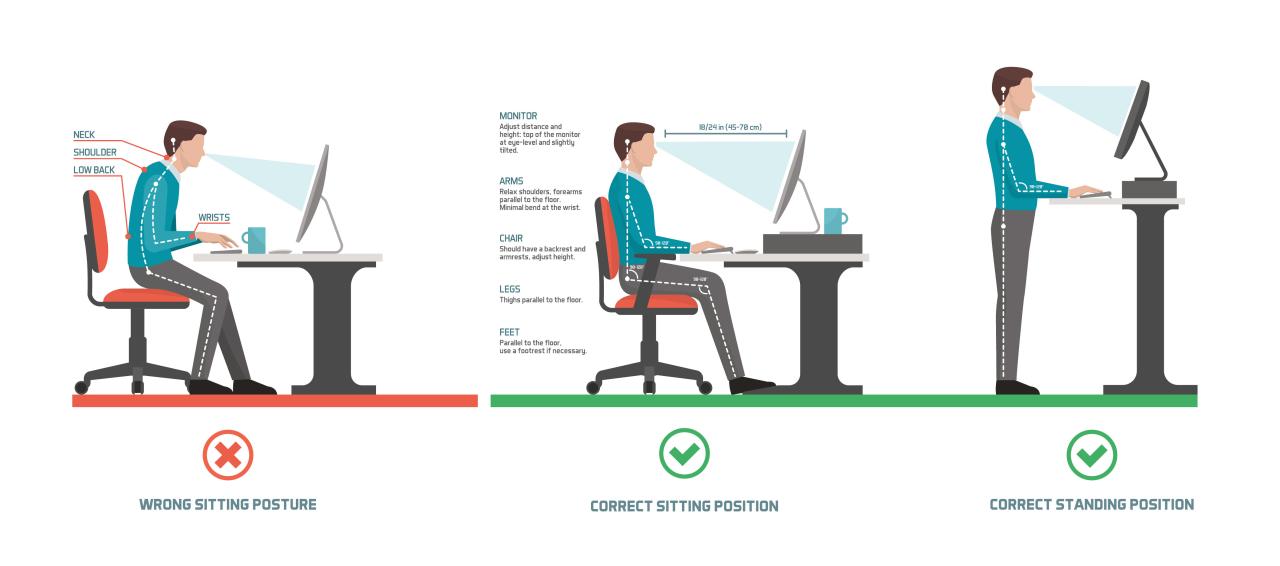
By understanding the importance of good posture and utilizing practical tools and routines, you can create a healthier and more comfortable work environment. Consistent practice and awareness will lead to lasting improvements in your musculoskeletal health and overall quality of life.